Font Changer ✨ Change Your Font Online in One Click
Type your text, pick a style and tap Copy. Free, no app or sign-up.
Tip: tap ☆ next to a style name to save it under Favorites.
Font changer for any text, free and instant. Pick from 24 style families with 14 decoration options, then paste your styled text into Instagram, TikTok, Discord, WhatsApp or any text box. These are Unicode characters, not installed fonts, so you can change font style on iPhone, Android and desktop with no app or sign-up.
How to Use a Font Changer in 3 Steps
A font changer turns plain letters into styled Unicode text that you can paste almost anywhere. Using this font changer online takes under ten seconds.
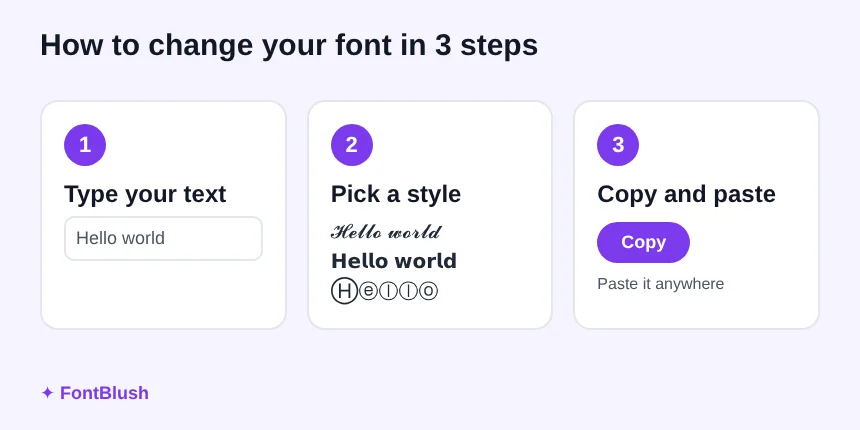
- Type your text in the box at the top of the page. Every style updates as you type.
- Pick a style. Choose a decoration and a style family such as script, bold, gothic or bubble, and star the ones you like to keep them in Favorites.
- Tap Copy and paste. Copy one style or use Copy All, then paste it into your bio, caption, name or chat.
The result is text, not an image, so you can change font style in any app that accepts normal text. Nothing is installed on your phone or computer.

What Is a Font Changer and How Does It Work?
A font changer is an online tool that swaps the letters you type for look-alike characters from the Unicode standard. Unicode includes many alphabets and symbol sets, such as mathematical script, bold and double-struck letters, and circled or squared letters. The tool maps each normal letter to the matching character in the style you choose.
Because those characters are real text, you can copy and paste them like any other word. That is the main difference between a font changer and a font file. A font file changes how text looks on one device, while a font changer changes the characters themselves, so the style travels with the text.
Why It Works Without an App
Your phone already contains the characters. The tool only picks the right ones for you, which is why no download, account or keyboard is needed. A font changer keyboard does the same job inside your phone, but the copy and paste method works on every device.
Font Changer Styles You Can Copy and Paste
Every style below is built from Unicode characters, so the same text works in most apps. The examples use the name Maya. Type your own text in the tool above to see it in all 24 style families.
| Style | Example | Often chosen for |
|---|---|---|
| Bold script | 𝓜𝓪𝔂𝓪 | Soft, aesthetic names |
| Bold sans | 𝗠𝗮𝘆𝗮 | Clear, bold names |
| Double-struck | 𝕄𝕒𝕪𝕒 | Clean, modern look |
| Fraktur (gothic) | 𝔐𝔞𝔶𝔞 | Edgy or gaming profiles |
| Small caps | ᴍᴀʏᴀ | Subtle bios and short taglines |
| Bubble | Ⓜⓐⓨⓐ | Playful captions and cute posts |
| Fullwidth | Maya | Spaced-out, vaporwave-style lines |
| Decorated | ✧ 𝓜𝓪𝔂𝓪 ✧ | Names and bios that need a little sparkle |
Mix Styles With Decorations
Add one of 14 decoration options, such as hearts, stars, sparkles or flowers, and each style becomes a new look. That gives you 336 combinations to copy and paste. The tool keeps your favorites and recent copies, so you can reuse a look without typing it again.
Font Changer Online vs App vs Installed Fonts
A text changer, a font changer and a font generator all describe the same idea: converting normal text into styled Unicode text. People also search for apps and font downloads, which solve a different problem. This table shows which option fits your goal.
| Option | What it changes | Works in bios and chats | Needs install |
|---|---|---|---|
| Online font changer (this tool) | The text you type, as Unicode characters | Yes, in most places that accept text | No |
| Font changer app or keyboard | What you type on your phone, using the same kind of Unicode text | Yes, in most apps | Yes, an app or keyboard |
| Installed font file (TTF or OTF) | How text looks on your own device or in your documents | No, other people see their own default font | Yes, on your device |
| Font menu in Word or Google Docs | The typeface of one document | Only inside that document | No |
To change font style in a bio, name or chat, an online tool is the quickest option. To change the typeface of a document or website, use the font setting in that app instead.
How to Choose the Right Font Style
The best style depends on where people will read it. A few simple rules keep your text attractive and readable.
Names and Bios
Pick clear styles such as bold sans or double-struck so people can still read your name. Script styles look soft but can be harder to read at small sizes.
Captions and Comments
Use styled text for one eye-catching word or line. If you change font on every word, a caption becomes tiring to read.
Gaming and Aesthetic Profiles
Gothic, bubble and decorated styles suit gaming tags, aesthetic bios and fan pages. Add a decoration such as stars or hearts to match the mood, and check the result on your phone before you save it.
Where a Font Changer Works
Styled text works wherever a text box accepts Unicode. Usernames and handles usually do not, because they allow only plain letters, numbers and a few symbols.
| Where you paste it | Styled text | What to know |
|---|---|---|
| Yes | Display name, bio and captions accept it. The @username allows only letters, numbers, periods and underscores. | |
| TikTok | Yes | Display name, bio, captions and comments accept it. The @username stays plain. |
| Discord | Yes | Display names, nicknames and messages accept it. Some servers limit special characters. |
| Yes | Chat messages, your About line and group names. | |
| Facebook, X and YouTube | Yes | Posts, comments and bios. Handles and links stay plain text. |
| Email addresses, links, passwords | No | These need plain letters and numbers. |
Need a style made for one app? Try our Instagram fonts, TikTok fonts or Discord fonts pages.
Why Some Characters Show as Boxes or Question Marks
A box or question mark means the device has no glyph for that character, so it shows a placeholder. It is a display issue on that phone or app, not a mistake in the text you copied.
- Try another style. Bold sans and double-struck are widely supported.
- Update your phone or app, because new characters reach devices at different times.
- Skip rare decorations if the person reading it has an older device.
- Paste the same text into another app to see whether the problem is the app or the device.
Unicode is the shared standard behind these characters. You can read more about it from the Unicode Consortium.
Accessibility: When Not to Use a Font Changer
Styled text looks good, but screen readers may read it letter by letter or skip it, because the characters are not regular letters. Search can also miss it. Use it for style, not for anything people must be able to read.
- Important details: keep dates, prices, addresses and contact details in plain text.
- Names: keep your username or handle plain so people can find and tag you.
- Length: style one line or a short bio, not whole paragraphs.
- Formal use: avoid it in emails, resumes, links and forms.
The W3C Web Accessibility Initiative explains how people read online content with assistive tools.
More tools: fancy fonts, stylish fonts, cursive fonts and the fancy text generator. You can also browse aesthetic fonts for soft, vaporwave and script looks. For a broken or zalgo look, try the glitch text generator.
Font Changer FAQ
What is a font changer?
A font changer is an online tool that converts the text you type into styled Unicode characters, such as script, bold, gothic or bubble letters. You copy the converted text and paste it wherever you want the new look.
How do I change font on Instagram or TikTok?
Type your text in the tool above, pick a style and tap Copy. Then paste it into your display name, bio or caption. These apps have no font menu for those fields, so pasted Unicode text is the usual way to change font style.
Is this tool free?
Yes. There is no charge, no sign-up and no app to install. You type, pick a style and copy.
Are these real fonts?
No. The tool does not install or alter a font file. It swaps each letter for a matching Unicode character, so the new look stays with the text when you paste it elsewhere.
Why do I see boxes or question marks?
A box or question mark shows up when a phone or app cannot display one of the characters. Try a different style, update your device or app, or skip rare decorations.
Does it work on iPhone and Android?
Yes, on most phones. How a style looks depends on the operating system and app version, so a few styles may show differently on older devices.
Can I change font in Word or Google Docs with it?
No. This tool creates styled text to paste, not a font setting for a document. Use the font menu in Word or Google Docs to change a document typeface.
What is the difference between a font changer and a text changer?
Not much. Font changer and text changer are two names for tools that convert your text into styled Unicode characters, and neither installs a font.
Can I use styled text in my username?
Usually not. Most platforms limit usernames to plain letters, numbers and a few symbols. Use styled text in display names, bios and captions instead.
Is styled text bad for accessibility or SEO?
It can be, so use it with care. Screen readers may read styled characters poorly and search engines may not read them as normal words, so keep key details in plain text.
How many styles does this tool have?
It offers 24 style families and 14 decoration options, which combine into 336 looks. You can star favorites and use Copy All to copy every style.

Syed Kamal Jafri — Founder, FontBlush.com
Syed builds and maintains the free text tools on this site. Every style is made from standard Unicode characters, so it can look different from app to app.